Help Requested: Python Setup 763-NHD-0420CW-AW3

Good Morning,
I have purchased a 763-NHD-0420CW-AW3 NewHaven Character Dipslay and I'm currently trying to get it to run.
To send data to the display, I'm using a Raspberry Pi 3 and simple python scripts.
I have used some other Newhaven character display before this one.
The problem is that I'm unable to figure out if i connected the Pins correctly, since the screen displays nothing, when I run the test script.
The Script is asking for this:
__init__(self, dc, clk, cs, d0, d1, d2, d3, d4, d5, d6, d7, reset):
And I've tried the display pins that sounded most alike (display manual) to GPIO pins and hand them over:
lcd=NhdLcd(2,3,18,26,19,13,6,4,17,27,22,10)
Got my test script from here:
https://github.com/wjskrydl/nhd-oled
Power etc should also be connected correctly.
Is there something special, that I need to keep in mind with this specific display?
Is my Pin layout correct?
-

Please check pins 17-19 for BS0 to BS2 on the display. For an 8-bit parallel interface, pin 17 is tied low, pins 18 and 19 are tied high.
Best Regards,0 -

SOLVED
We tried connecting the Display using the user manual (https://www.mouser.de/datasheet/2/291/NHD-0420CW-AW3-1266321.pdf)
This is our working setup: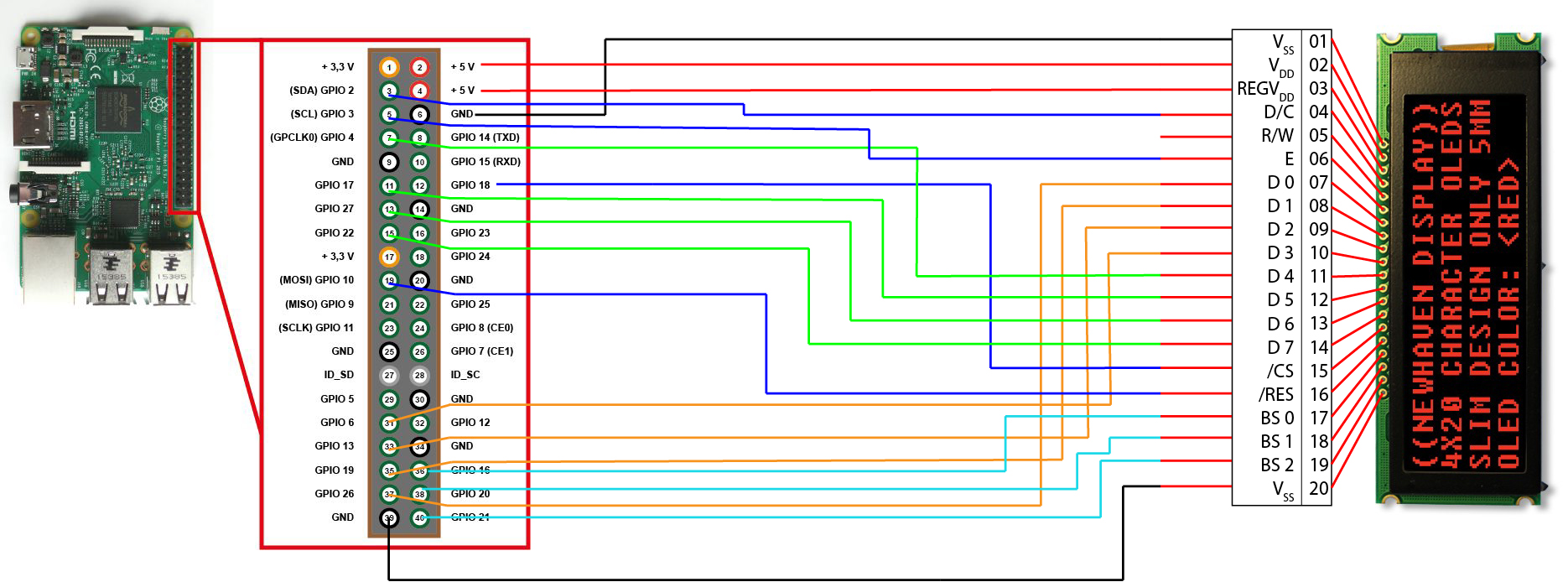
A few necessary additions in our code:
        self.__b0=16
        self.__b1=20
        self.__b2=21

        #B
        GPIO.setup(self.__b0, GPIO.OUT)
        GPIO.setup(self.__b1, GPIO.OUT)
        GPIO.setup(self.__b2, GPIO.OUT)
        GPIO.output(self.__b0, GPIO.LOW)
        GPIO.output(self.__b1, GPIO.HIGH)
        GPIO.output(self.__b2, GPIO.HIGH)
thank you!
0 -
pin 17 is tied low, pins 18 and 19 are tied high.
What does tie high and tie low mean exactly? How do I need to connect them?
-> Send GPIO.High/GPIO.LOW by default
Further questions:
Should I rather use 2.8V or 5V mode?
EDIT:
Thank you i figured it out and managed to display text.0 -
Thanks for posting the update. Nice to see you have it working!
Best Regards,0
Please sign in to leave a comment.
Comments
4 comments