NHD-0216K3Z-FL-GBW-V3 outputting 5V on data pin

Hello,
I am using a NHD-0216K3Z-FL-GBW-V3 Serial LCD Module configured for RS-232 communication. Datasheet: http://www.mouser.com/ds/2/291/NHD-0216K3Z-FL-GBW-V3-35705.pdf
I have successfully transmitted data to the LCD using a PIC12 MPU (3.3V logic) on a breadboard. However, after soldering the components onto a protoboard, I discovered that my MPU was not functional and my LCD was outputting ~5V on its RS-232 serial data line (pin 1). There is no external connection between the data pin and the supply pin, so I suspect that there is an internal short-circuit that happened during soldering.
I have not been able to test the data communication because I have no extra PIC12s, but I'm willing to bet that a new PIC12 will break once it's connected to the 5V coming out of the LCD data pin.
So now I am trying to decide if I need to order a new LCD in addition to a new PIC12. Is there any reason, other than it being broken, that the LCD would output 5V on its data input pin? Thank you.
-

I’m sorry to hear about the trouble you are having with the NHD-0216K3Z-FL-GBW-V3. All displays are tested before they leave our facility, chances that it is DOA is fairly low.
First to enter the RS‐232 mode, both R1 and R2 should be open. Can you please confirm that both R1 and R2 are open on the back of the display?
Second, can you please confirm you are using matching the displays BAUD rate? By default the BAUD rate is 9600, and is changeable with a command function (see page 7 in the displays datasheet).https://newhavendisplay.com/content/specs/NHD-0216K3Z-FL-GBW-V3.pdf
Third, the RS232 signal must be 5V TTL compatible, can you also confirm that this is what you are using for the communication?
Finally, can you provide me with a detailed pin-out diagram so I can verify your connections.0 -
Hi Paul, thanks for the response. R1 and R2 are open, and the baud rate for the program is 9600. I was able to get the LCD to display characters correctly on a breadboard, but my problems started after soldering the parts to a protoboard. Here's my schematic:
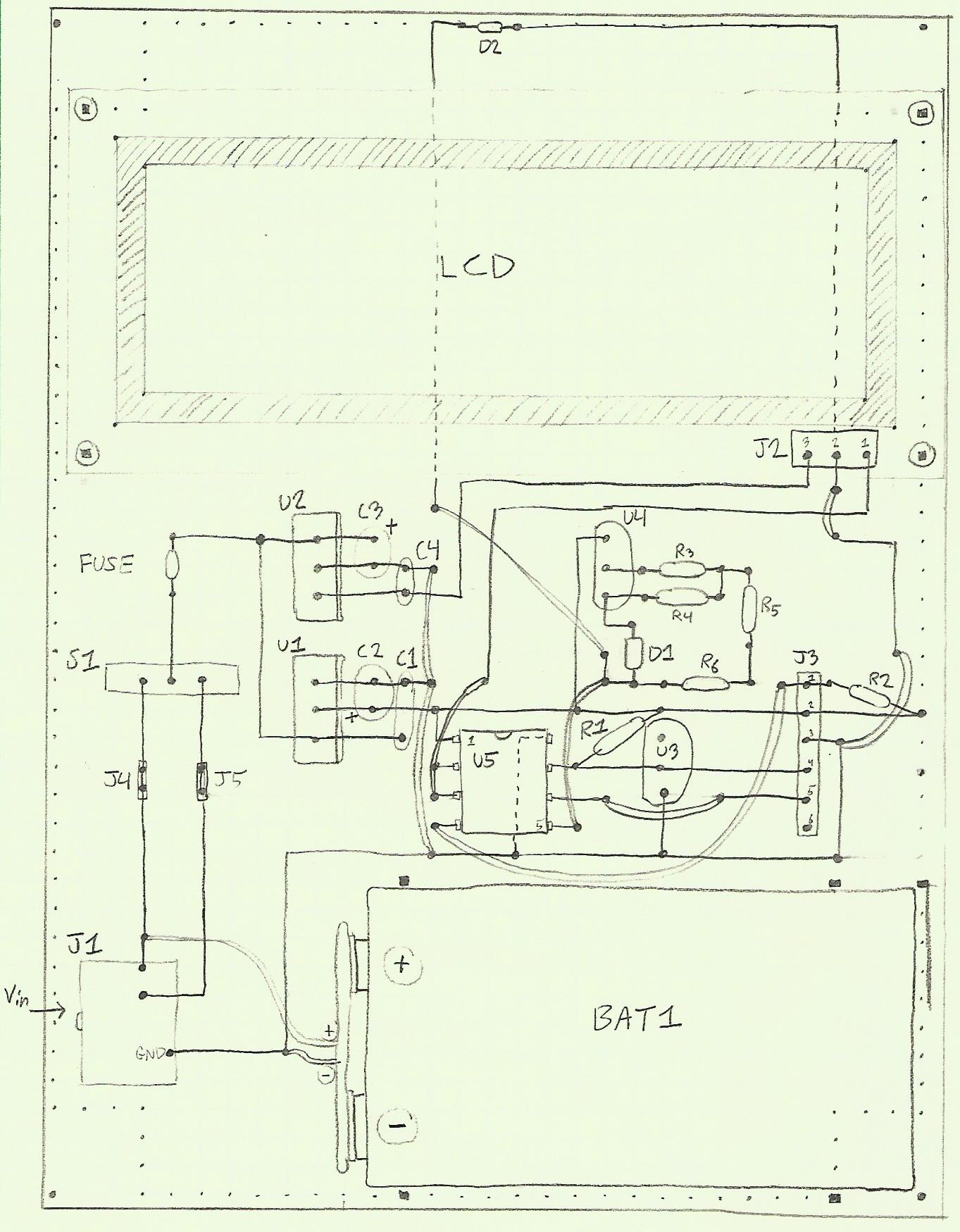
Pin 3 of the LCD is supplied by a 5V Linear Regulator (U2 on the schematic), pin 2 is grounded, and pin 1 is connected to pin 3 of the PIC12 (U5).
I overlooked the fact that the RS232 signal should be 5V compatible. The PIC12 that I am using has 3.3 V logic levels. So that may be the problem. Still, the data communication worked earlier with the 3.3 V signal.
I ordered another LCD (the same one) and replaced my initial LCD, and I replaced my PIC12, but my programmer is still not detecting the PIC12. So, I will explore the possibility of wrong connections between the programmer and LCD. I should also note that the new LCD is outputting around 5V on the data input port (pin 1) as it was with my initial LCD, and I still don't know if this is a problem or not. Shouldn't this voltage be resting at zero if there is no connection to the PIC12?0 -
Paul,
I replaced my 3.3V MPU with a 5V MPU and it solved my problems. There was nothing wrong with either LCD. I just overlooked the fact that the LCD required 5V logic. This would have been one of the first things I checked had the LCD not worked at all, but as I said, it was initially able to transmit the data with 3.3 V. Lesson learned: always read the datasheet thoroughly Thanks again for your help.0 -
Glad to hear you got your display up and running!
Thanks for sharing your solution, it will definitely help others0
Please sign in to leave a comment.
Comments
4 comments