NHD-0216SZW display control not working from PSOC5

The NHD-0216SZW, 2x16 OLED display, is connected to a 4-bit interface of the PSOC5-LP. The PSOC driver is standard for displays.
The display will show a text string, but i have no control over setting the line or cursor position, clearing etc, of the display.
For example, commands such as LCD_Position(0u,3u); or LCD_Position(1u,0u); have no impact.
Perhaps the forum has some ideas.
thanks
-
Fortunately, i was able to find the solution searching the Web.
The LCD API driver provided by the PSOC5LP library will not work for a Newhaven NHD OLED display.
The control bytes are different.
Please look at the link below.
https://community.cypress.com/thread/17632?start=15&tstart=0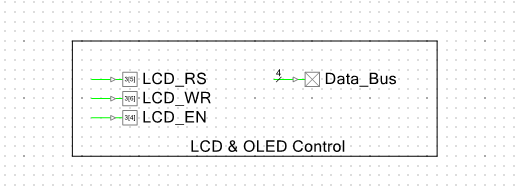
 0
0 -
 Hi Dfishman,
Thanks for the update, this will be helpful to other users.
If you were still looking for sample code to reference, please visit our OLED section of our 'example code' page on our website below. The code written for our NHD-0216KZW family displays should also work well with the NHD-0216SZW family displays.
https://support.newhavendisplay.com/hc/en-us/sections/4409540370839-OLED-
Best,0 -
Hi,
I got around to program the code provided in the referenceExample, https://support.newhavendisplay.com/hc/en-us/articles/4413884327831--NHD-0216KZW-0220DZW-0420DZW-4-bit
Unfortunately, my code did not work. Only garbage on the display.
I call LCD_Example in my code to have the display initialized and print out 2 lines.
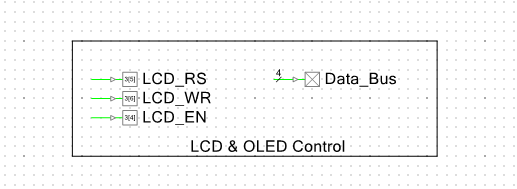
I'm attaching the code that was tested.void Nibble()
{
LCD_EN_Write(1); // EN (E on appnote)- Enable for Display
CyDelay(1);
LCD_EN_Write(0);
}
void Command(char input)
{
Data_Bus_Write(input);
LCD_RS_Write(0); // RS (D_I on appnote) - Command/Text control RS =
0, Command RS = 1, Text
LCD_WR_Write(0); // WR (R_W on appnote) - Read/Write Control
Nibble();
input = input << 4;
Data_Bus_Write(input);
Nibble();
}
void Text(char input)
{
Data_Bus_Write(input);
LCD_RS_Write(1);
LCD_WR_Write(0);
Nibble();
input = input << 4;
Data_Bus_Write(input);
Nibble();
}
void LCD_Example(void)
{
//Init
Data_Bus_Write(0x00);
LCD_EN_Write(0);
LCD_RS_Write(0);
LCD_WR_Write(0);
CyDelay(50);
Nibble();
CyDelay(50);
Nibble();
CyDelay(50);
Nibble();
CyDelay(10);
Data_Bus_Write(0x20);
Nibble();
CyDelay(10);
Command(0x28);
CyDelay(10);
Command(0x10);
CyDelay(10);
Command(0x0C);
CyDelay(10);
Command(0x06);
CyDelay(10);
Command(0x01);
Command(0x02);
Command(0x80);
char text1[] = {"Newhaven Display"};
char text2[] = {"2 Lines 16 Char "};
int i;
Command(0x02); // First Line
for (i=0;i<16;i++)
{
Text(text1[i]);
}
Command(0xc0); // Second Line
for (i=0;i<16;i++)
{
Text(text2[i]);
}
}« Last Edit: March 26, 2020, 05:24:42 PM by dfishman »0 -
Hi dfishman,
Just to be sure, can you confirm DB4-DB7 from the display are being used in 4-bit parallel mode, and are not cross-wired incorrectly by accident?
If you can also upload an image of which garbage characters the display is showing, this would also be helpful.
Best,0
Please sign in to leave a comment.
Comments
4 comments