NHD-1.69-128160ASC3 16-Bit Color Setting

Hi,
Is it possible to set the individual pixels of NHD-1.69-128160ASC3 OLED to 16-bit color. All the examples related to NHD-1.69-128160ASC3 OLED are with respect to 24-bit color format. For example the following code sets the color of a selected pixel.
void OLED_Pixel_160128RGB(unsigned long color)    // write one pixel of a given color
{
    OLED_SerialPixelData_160128RGB((color>>16));
    OLED_SerialPixelData_160128RGB((color>>8));
    OLED_SerialPixelData_160128RGB(color);
}
How can I display an image in 16-bit color bitmap array?.
best regards,
niradat.
-

Hello niradat,
Our code is configured for 8_bit mode with triple transfer setup, which almost simulates a 24-bit data transfer method. This can be configured and changed in the 'Set Memory Write Mode' command in our initialization routine.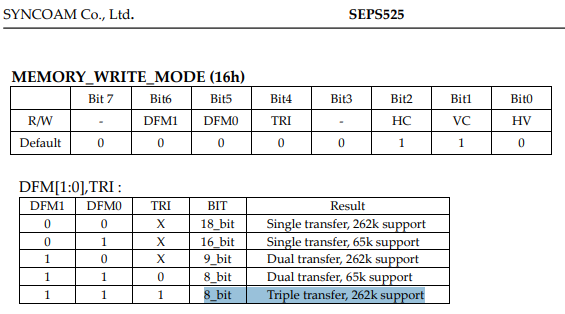
If you wish to use 16-bit transfer instead, you may use either 16-bit single transfer or 8-bit dual transfer by changing the state of the bits in the 'Set Memory Write Mode' command and making appropriate changes to the 'OLED_Pixel_160128RGB' function in our sample code. More details can be found on pg. 25 of the SEPS525 controller spec.0
Please sign in to leave a comment.
Comments
1 comment